Boundary Classifications
What core, supportive, adjacent, and excluded mean, and what to do with each.
What boundary classifications are
Every concept on your page is classified by whether it belongs there. The classification is not about quality; it is about scope. A well-written section on the wrong topic still weakens the page's structural signal — a page covering unrelated topics is harder for AI systems to accurately represent for any one of them.
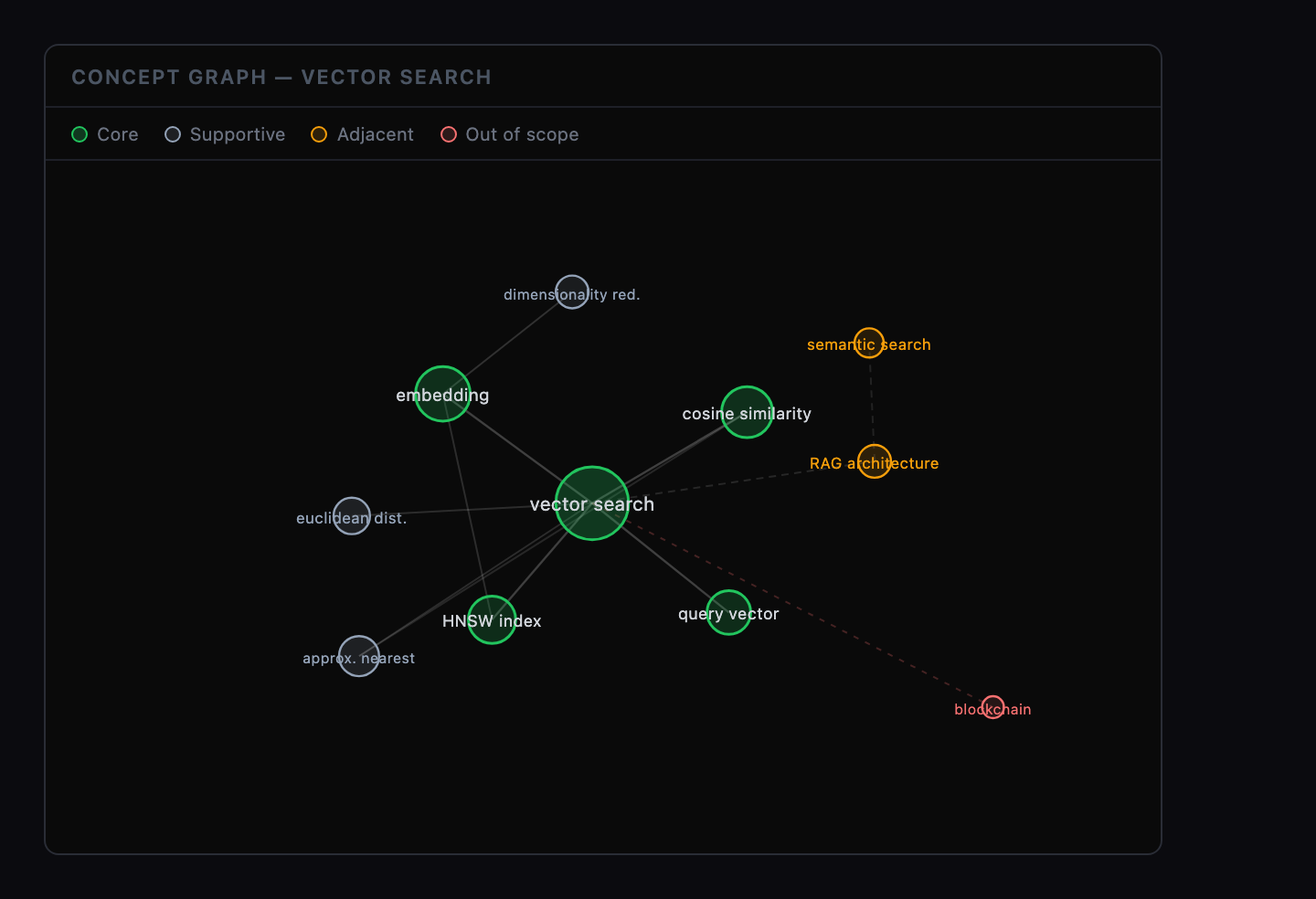
ContentGrapher assigns one of four labels to each concept it identifies in your content. Your page's primary topic is always classified as core — this is a fixed rule, not a judgment call. Every other concept is evaluated based on its relationship to the page's structural role.
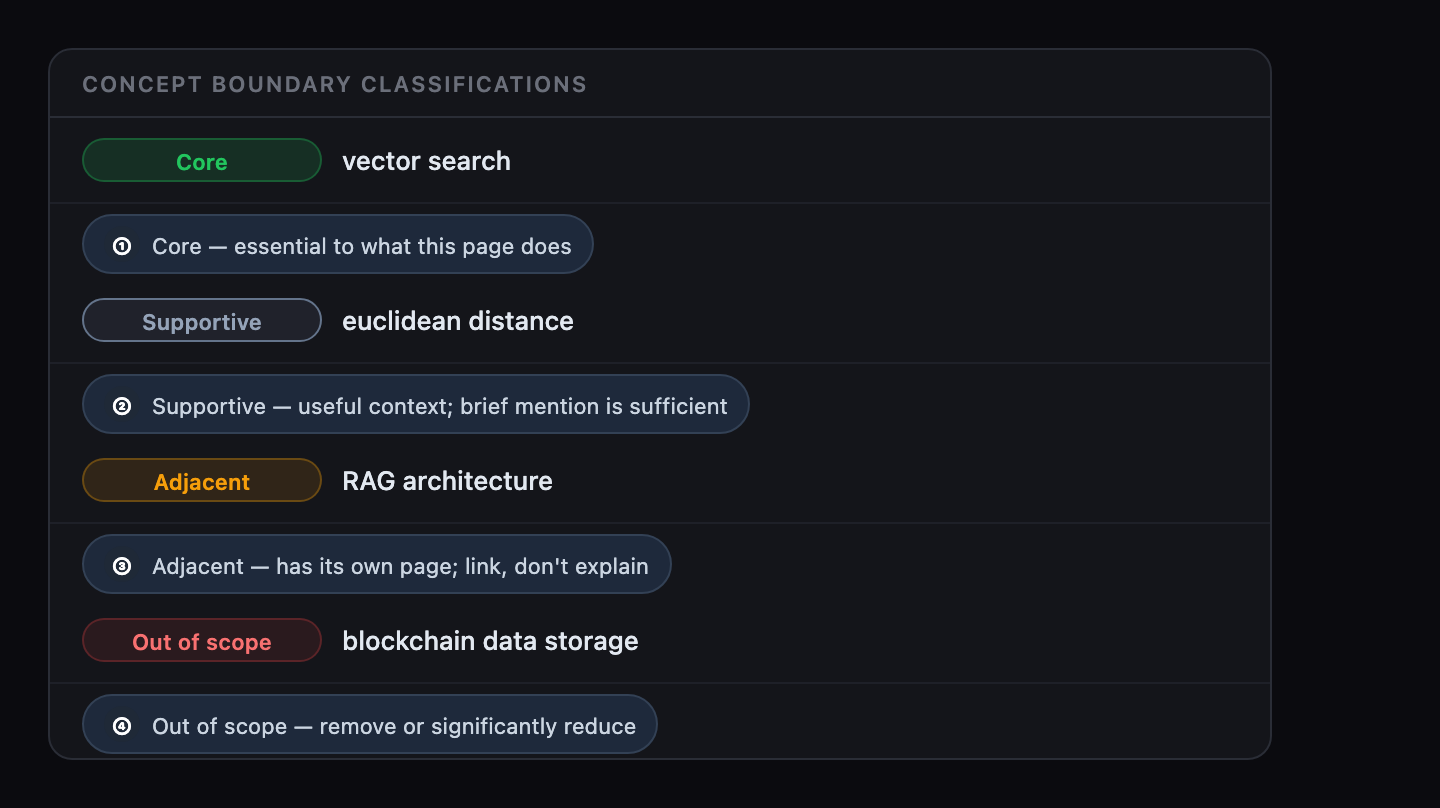
At a glance
Quick reference for how each classification is defined and what to do with it.
| Classification | Meaning | Action |
|---|---|---|
| Core | Essential to what this page does. The primary topic is always core. | Ensure fully integrated. Check integration state in the concept list. |
| Supportive | Provides useful context but does not need full explanation here. | A brief, accurate mention is sufficient. Do not over-explain. |
| Adjacent | Belongs on a separate, more focused page. | Link to the concept's dedicated page rather than explaining it here. |
| Excluded | Out of scope entirely. Its presence dilutes retrieval accuracy. | Remove or significantly reduce. |
Core
A core concept is essential to what this page is trying to do. If your page explains how OAuth 2.0 works, then "authorization code flow" is core. It must be covered fully at the depth this page's audience and retrieval role require.
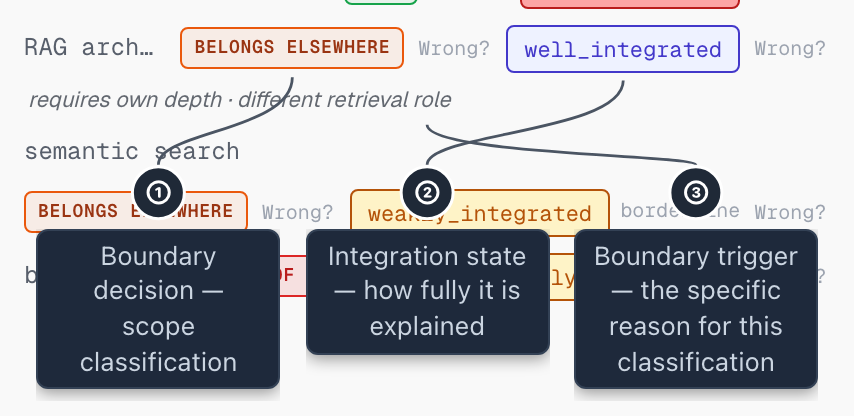
Action: Ensure every core concept is well-integrated. The integration state shown alongside each concept tells you its current status: well_integrated means it is fully covered; weakly_integrated or underexplained means the writing brief will flag it for clarification. See Coverage Score for how integration states are defined.
Supportive
A supportive concept provides useful context but does not need to be fully explained here. It grounds the core without becoming its own topic.
Action: A brief, accurate mention is sufficient. Do not over-explain supportive concepts; doing so pulls focus from the page's core topic and introduces content that belongs elsewhere.
Adjacent
An adjacent concept belongs on a separate, more focused page. It may be closely related, but it has its own depth of explanation that this page cannot and should not provide.
Action: Link to the adjacent concept's dedicated page rather than explaining it here. If that page does not exist, creating it is a content planning task, not a gap in this page. The boundary trigger alongside the classification explains the specific reason ContentGrapher placed it here.
This "belongs elsewhere" judgment is the classification ContentGrapher has studied most closely. The Agreement Study, ContentGrapher's published research, compared how eight AI models make this exact call on the same set of pages, with a sample of those calls reviewed by a panel of models from five different makers. It is a useful read if you want to understand how consistent this judgment is and why a borderline concept can land on either side of the line.
Excluded
An excluded concept is out of scope entirely. In ContentGrapher's model, its presence dilutes the page's structural signal: a page that mixes unrelated topics is harder for AI systems to accurately represent for any one of them.
Action: Remove or significantly reduce excluded content. If you believe the classification is wrong, read the boundary trigger first. Then check whether the concept introduces a different structural role (explain, guide, compare, evaluate, or convert) than this page's primary role.
Understanding boundary triggers
Each boundary classification comes with one or more boundary triggers: the specific reasons ContentGrapher assigned that classification. These appear alongside each concept in your analysis results.
Common triggers include: the concept requires its own full depth of explanation to be useful here; it belongs to a different structural role than the page's primary role; or it introduces a different stage of the reader's task progression than this page serves.
Boundary triggers are the most actionable signal when you disagree with a classification. Start there — the trigger states exactly what to address.
For borderline concepts, the trigger is also more stable across runs than the specific label. In the Findability Study, the lists of belongs-elsewhere concepts overlapped by about 60% on average across repeated runs, against a pre-registered target of 70%, and came in under that target. The figures are study-specific; your page will differ. If you re-analyze and a borderline concept lands on the other side of the line, read the trigger in both runs to see whether the structural reason changed, not just the label.
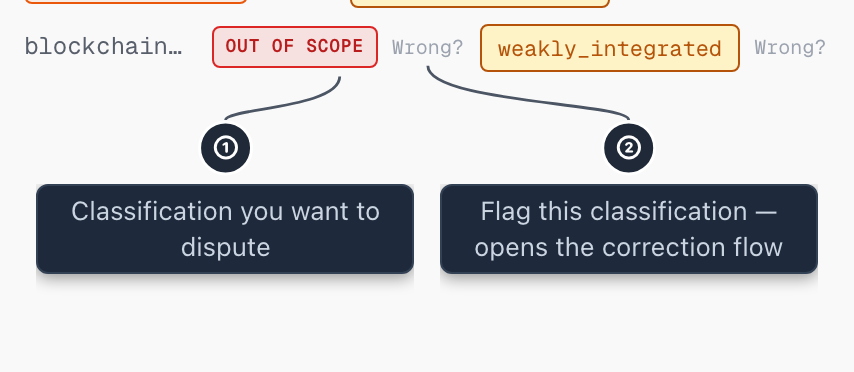
If the classification seems wrong
First, read the boundary trigger for that concept. It states the specific reason and is the most direct path to understanding whether to accept or dispute the classification.
Second, check what primary retrieval role ContentGrapher detected for this page. A concept classified as adjacent is often correctly placed because it belongs to a different stage of the explanation journey than this page's role allows. See Primary Retrieval Role for how roles are defined.
Third: your page's primary topic (the anchor) is always classified as core. This is a fixed rule that the analysis cannot change.
Fourth: if you believe the page's primary role is miscategorized, check the anchor first. An incorrect anchor produces an incorrect role classification. The anchor is editable in the analysis header.
A note on borderline calls. In the Agreement Study, a five-model review panel from five different makers judged a sample of belongs-elsewhere classifications and found that roughly four in five were at least defensible while roughly three in five were clearly right. That gap, around 20% of sampled calls, is where the panel itself disagreed. These are the borderline classifications where reasonable expert reviewers can land on either side. The figures are specific to that study; the classification on your page will reflect your content. The practical reading: when a call feels contestable and the boundary trigger states a structural reason that makes sense for the page, the trigger is the most reliable signal to act on, even when the verdict itself feels uncertain.
Why this matters
AI systems retrieve by concept association. In ContentGrapher's model, a page that tries to explain everything about a topic ends up explaining nothing fully. Boundary classification is how ContentGrapher identifies scope dilution.
Related topics