ContentGrapher
← Changelog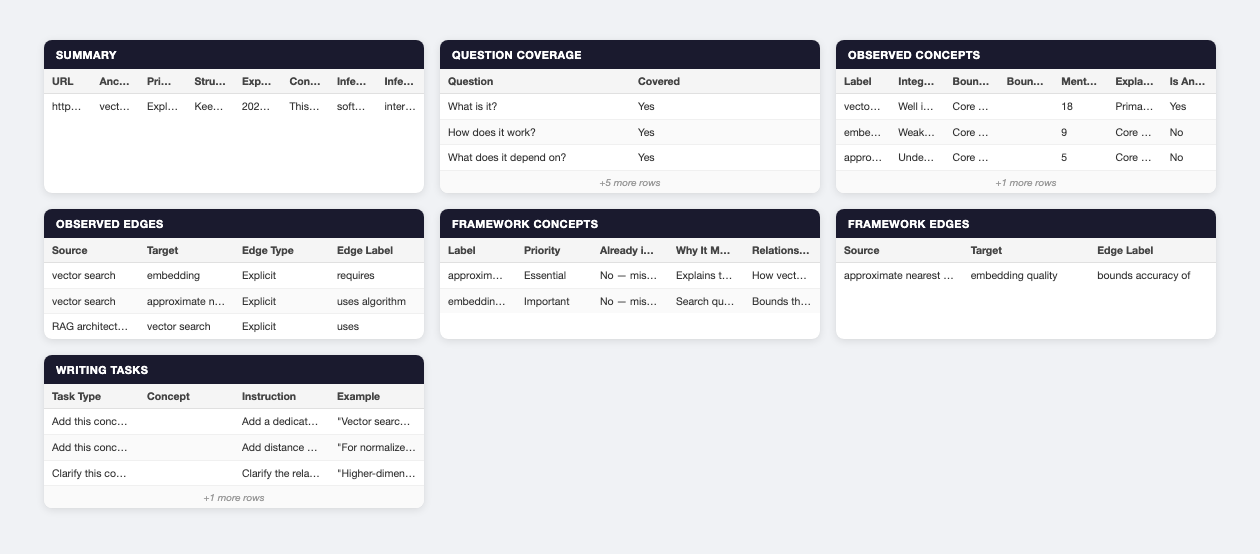
NewMay 27, 2026
Export analysis data to Excel
ContentGrapher now lets you download your analysis as a structured .xlsx file with one sheet per record type, so you can review, share, and process results outside the UI.
Problem
There was no way to take ContentGrapher analysis data out of the UI. All results lived only in the browser session. Users had no structured download, no way to process results offline, no path to share findings with stakeholders, and no mechanism to import analysis output into other tools.
What changed
Analysis results can now be exported as an .xlsx file with 7 dedicated sheets, one per record type. Each sheet contains only the columns relevant to that record type.
The export button appears in two places: in the top-right corner of any standalone report page (/report/[id]), and in the dashboard toolbar when you open a past analysis from the sidebar.
- Summary: URL, anchor, primary retrieval role, structural decision, export date, content summary, inferred audience, inferred depth
- Question Coverage: 8 rows, one per question, each with a Yes/No covered status
- Observed Concepts: label, integration state, boundary decision, boundary triggers, mention count, explanatory role, is anchor
- Observed Edges: source, target, edge type (Explicit/Implied), edge label
- Framework Concepts: label, priority, already in content, why it matters, relationship to anchor
- Framework Edges: source, target, edge label
- Writing Tasks: task type (Add / Clarify / Make explicit / Sentence guidance), concept, instruction, example